
ServiceMaterialLinks Builder
Every service with no materials linked is priced blind. This ties each one to the parts already in your book, so job costing holds and techs stop entering parts by hand.
See your unlinked services freeWhat it fixes
For pricebooks where a service mentions a part, but the material is not linked behind it. It targets:
- Services that should carry materials but do not
- Predictable parts left to tech memory
- Materials sitting in the catalog but not tied to any service
- Weak job-cost visibility
- Manual part entry on every ticket
What you get
- Every service that needs linked materials, counted from your own export
- Suggested material matches, drawn only from parts your book already carries
- Labor-only services excluded, so nothing is force-fit
- "Needs review" flags where the part depends on the job
- A reviewable service-to-material map you approve before you import
How it works
Drop in the .xlsx you export from ServiceTitan and pick the book you sell from. The gap read is free: you see how many of your services are priced blind before you spend a cent. When you are ready, pay once and get back a ServiceMaterialLinks file, everything we added highlighted, ready to re-import. Nothing changes in ServiceTitan until you import it yourself.
The free Pricebook Health Audit already flags the missing part costs and unlinked materials this tool fixes, so you can see the holes in your job costing today. Linked materials mean the right parts and the right cost come along automatically, which is one layer of a pricebook that sells. Want it linked for you, by hand? That is part of a done-for-you build.
Questions
Straight answers
How do I link materials to services in ServiceTitan?
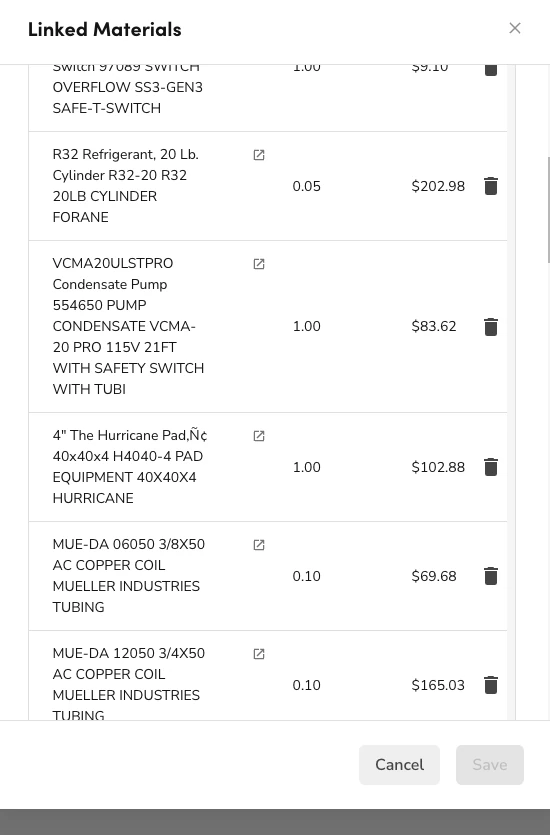
In ServiceTitan you open a service, go to its Materials tab, and add each part with its quantity, one service at a time. That is accurate but slow across a few thousand services, which is why most books have most services unlinked. This tool does it in bulk: it reads your export, matches the parts and quantities from links you already have, attaches the ones it is confident about, flags the rest for review, and hands back an import file. You review it and import it yourself, so nothing changes in ServiceTitan until you say so.
Do I need to link materials in ServiceTitan?
Yes, even on static prices. ServiceTitan’s own docs are clear that linked material costs are not added to the service price, but they are used to calculate prices in the Price Setup Wizard, and when you add the service to an invoice or estimate, all linked material costs are added. So linking is what makes job costing real and feeds Truck Replenishment. Unlinked services mean techs hand-enter parts and your costing is a guess.
Is my pricebook data safe?
Yes. The whole thing runs in your browser. Your file is never uploaded and nothing is stored on our side. You get back a new file with the links we added, and nothing changes in ServiceTitan until you import it yourself.
How does it know which material goes with which service?
It matches from your own book. It learns the parts and the quantities from links you already have, attaches the ones it is confident about, and flags anything ambiguous as "needs review" rather than guessing. It never invents a part you do not carry.
Will it overwrite the links I already have?
No. It only fills services that have no materials linked. Anything you already linked is left exactly as it is.
Is it a subscription?
No. You see your unlinked services free, then pay once for the file and keep it. The prebuilt pricebook subscriptions that rent you content run around $199 a month, every month. This is yours.
Which trades does it work for?
Plumbing, HVAC, and electrical. If your export holds more than one book, you choose which one to work on.